For businesses
Get found for Turkish coffee: a free checklist for owners
A coffee shop or restaurant that serves Turkish coffee should say so in readable text in five places: its Google Business Profile, its website menu, its structured data, Bing Places and Apple Business. This checklist covers each one in order. It takes an afternoon, costs nothing, and needs no technical skill beyond pasting one snippet.
Updated November 26, 2026 · 8 min read

Nothing here guarantees a ranking or a recommendation. It makes the facts about your business clear and consistent, which is the part you control. Feature names were checked on November 24, 2026. Google, Microsoft and Apple rename things often, so a button may have moved by the time you read this.
What should I do first?
Write down one official version of your name, address and phone number, then use it everywhere. Every later step depends on it. Differences such as "St." on one site and "Street, Suite 2" on another, or an old phone number on Facebook, make it harder for people and software to tell that the records describe one place.
- Write your business name exactly as it appears on your sign.
- Write your address in one format, including suite or unit number.
- Choose one public phone number.
- Write your website address in one form.
- Keep this in a note. Copy and paste from it in every step below.
How do I set up my Google Business Profile for Turkish coffee?
Search Google for your business name while signed in to the account that manages it, then select "Edit profile." Check your categories, hours and attributes, and add your coffee to the menu. Google reviews edits before they go live, so changes may not appear at once.
Name and categories
- Use your real name. Google's guidelines say unnecessary information in the business name isn't permitted and can lead to suspension. "Anatolia Coffee" stays "Anatolia Coffee." Adding "Best Turkish Coffee" to it breaks the rules.
- Check your primary category. It should match your main business. A Turkish restaurant and a coffee shop would choose differently. Type into the category field and pick from Google's list.
- Add additional categories only if they are true. Google allows up to nine more and asks you to use as few as describe your core business. Categories are for what you are. What you serve belongs in the menu.
Menu
Food and drink businesses have a menu editor. This is the most direct place to state that you serve the coffee.
- Select Edit menu.
- Select Add menu section and name it, for example "Coffee."
- Select Add menu item. Name it the way customers ask for it: "Turkish coffee."
- Write a one-line description in your own words, such as "Finely ground coffee brewed in a cezve, served unfiltered. Choose plain, medium or sweet."
- Add the price.
- If you serve other cezve-brewed styles, such as Greek or Armenian coffee, add each as its own item.
- Under Photos of menu, upload a clear photo or PDF of your printed menu.
- Set your Menu link to the menu page on your own website. You will find it among your business information when you edit the profile.
- If you see dietary badges on menu items (vegetarian, vegan, and since October 2026 gluten-free, dairy-free, halal and kosher are rolling out), check only the ones that are true.
Menu changes can take 24 to 48 hours to appear.
Attributes, hours and description
- Attributes. Fill in every factual attribute that applies, such as outdoor seating or Wi-Fi. The list you see depends on your category.
- Hours. Confirm regular hours. Add special hours for holidays.
- Description. Say plainly what you are and that you serve Turkish coffee brewed in a cezve. Google's guidelines ask for no links and no focus on prices or sales.
- Website link. Use the address from your note.
Photos
- In Photos & videos, add a clear photo of your storefront so people recognize it from the street.
- Add a photo of the coffee as you serve it: cup, cezve, water, sweet.
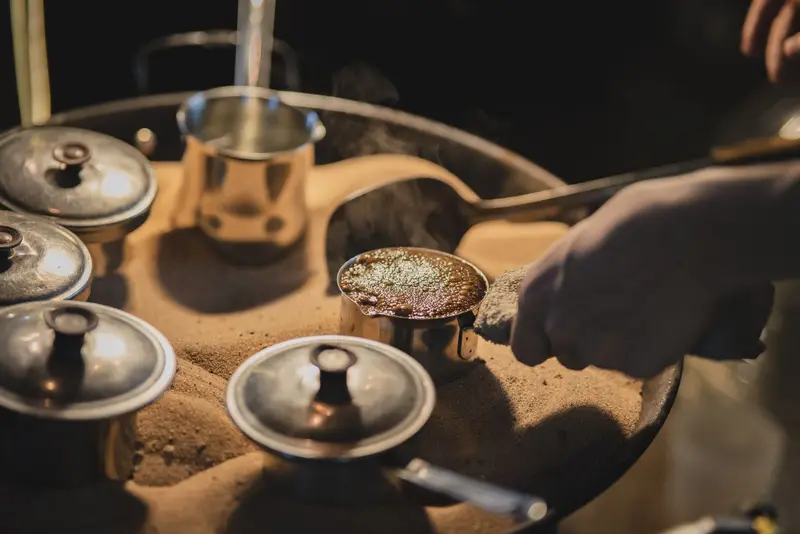
- Add a photo of the brewing, especially if you use hot sand.
- Use your own photos, taken at your place.
How should my website menu mention Turkish coffee?
Put the words "Turkish coffee" on your menu page as real text. If your menu is only a photo or a PDF, add a typed version beneath it. Text can be read by search engines, AI assistants, screen readers and translation tools. A picture of text is far less reliable.
- Open your menu page and try to select the words "Turkish coffee" with your cursor. If you can't highlight them, they are part of an image.
- Add a typed line for each cezve coffee you serve, with a short description and price.
- Keep your own name for the drink and add the common English one beside it: "Türk kahvesi (Turkish coffee)," "Ellinikos (Greek coffee)," "Qahwa (Arabic coffee)."
- Say how you brew it if that is part of the appeal: "brewed in a copper cezve over hot sand."
- Put your name, address and phone in text in the footer of every page, copied from your note.
- Add a short FAQ to your site with the questions people ask you (see the last section).
What structured data should my website have?
Add one block of schema.org markup to your home page. It repeats your name, address, phone, hours and menu link in a standard format that software reads. Paste it into the page's HTML, or ask whoever maintains your site. Most website builders have a "custom code" or "header code" box for this.
Replace every value with your own. Remove any line you can't fill in truthfully.
<script type="application/ld+json">
{
  "@context": "https://schema.org",
  "@type": "CafeOrCoffeeShop",
  "name": "YOUR BUSINESS NAME",
  "url": "https://www.yourcafe.com/",
  "telephone": "+1-555-555-0100",
  "address": {
    "@type": "PostalAddress",
    "streetAddress": "123 Main Street",
    "addressLocality": "Your City",
    "addressRegion": "NY",
    "postalCode": "10001",
    "addressCountry": "US"
  },
  "servesCuisine": ["Turkish", "Coffee"],
  "hasMenu": "https://www.yourcafe.com/menu/",
  "openingHoursSpecification": [
    {
      "@type": "OpeningHoursSpecification",
      "dayOfWeek": ["Monday", "Tuesday", "Wednesday", "Thursday", "Friday"],
      "opens": "08:00",
      "closes": "18:00"
    }
  ],
  "sameAs": [
    "https://www.instagram.com/yourcafe/"
  ]
}
</script>
- Use
Restaurantin place ofCafeOrCoffeeShopif you are mainly a restaurant. - Make every value match your note and your Google profile exactly.
- Test the page in Google's Rich Results Test and the Schema.org validator.
- Update the block whenever your hours or phone change.
Do I need Bing Places and Apple Business too?
Yes, both are free and take a few minutes each. Bing's data feeds Microsoft's search and Copilot products, and Apple's place cards appear in Apple Maps, Safari and Spotlight on every iPhone. An unclaimed or outdated record in either one works against the consistency you just built.
Bing Places for Business
- Go to bing.com/forbusiness. Microsoft moved Bing Places there in October 2025.
- Use the import from Google Business Profile so your details carry over.
- Check the imported name, address, phone and hours against your note.
- Follow the recommendations the dashboard shows, such as adding photos or a website.
Apple Business
Apple Business Connect was retired on April 14, 2026. Its tools now live in Apple Business, and existing accounts were moved over automatically.
- Sign in to Apple Business and claim your location on Maps.
- Check name, address, phone and hours against your note.
- Add photos to your place card.
- Set an action such as "Order" or "Reserve" if you offer it.
Everywhere else
- Check Yelp, Facebook, Instagram, TripAdvisor and any delivery apps you use. Correct the name, address, phone and hours to match your note.
- Find your listing on TurkishCoffee.us and claim it if anything is off.
How do I answer "do you serve Turkish coffee?" online?
Answer it in writing in every place a customer can ask. Google wound down the public Questions and answers section on Business Profiles in late 2025. In December 2025 a Google product specialist wrote in the company's help forum that the feature was changing, and pointed to an AI-powered "Ask" button in Google Maps that answers from the business's own answers and from reviews. Local search firm Whitespark reported in January 2026 that owners could no longer add questions, and that the Ask feature showed on US profiles it checked but not in Canada, with answers that cited things like the menu and reviews. Your job is to make the right answer easy to find.
- Add the question to an FAQ on your own website with a direct answer: "Yes. We serve Turkish coffee brewed to order in a cezve, every day we're open."
- Add the related questions you hear at the counter: sugar levels, whether it is available to go, whether you sell ground coffee or cezves.
- Reply to reviews that mention your Turkish coffee, and name the drink in your reply. Keep it natural and true.
- Answer messages and social media DMs that ask, promptly and in the same words.
- If your Business Profile shows you customer questions to answer, answer them. Google says those answers feed the Ask button.
- In the Google Maps app, open your own profile and try asking the question. If the answer is wrong, the fix is usually in your menu editor or on your website.
- Never write or buy reviews. Ask real customers, in person, and leave the wording to them.
What should I check every few months?
Set a reminder every three months. Ten minutes is enough.
- Hours, including holidays, on Google, Bing, Apple and your website.
- Prices and items in the Google menu editor.
- The schema block on your website.
- New photos.
- Ask ChatGPT, Gemini, Claude, Perplexity and Google whether your place serves Turkish coffee, and note what each says. Answers vary from one day and one person to the next, so treat them as a spot check.
Sources
- Google Business Profile Help: Edit your Business Profile
- Google Business Profile Help: About the menu editor
- Google Business Profile Help: Guidelines for representing your business on Google
- Search Engine Roundtable: New Google local dietary attributes (gluten-free, dairy-free, halal, kosher)
- Search Engine Roundtable: Google removing Q&A feature in Google Maps for AI-powered Ask button (December 15, 2025; reports Google's own Help Forum statement)
- Whitespark: With Google Q&A gone, you need a Maps 'Ask a question' strategy (January 26, 2026)
- Bing Search Blog: Introducing the new Bing Places for Business
- Apple Newsroom: Introducing Apple Business
- Schema.org: CafeOrCoffeeShop